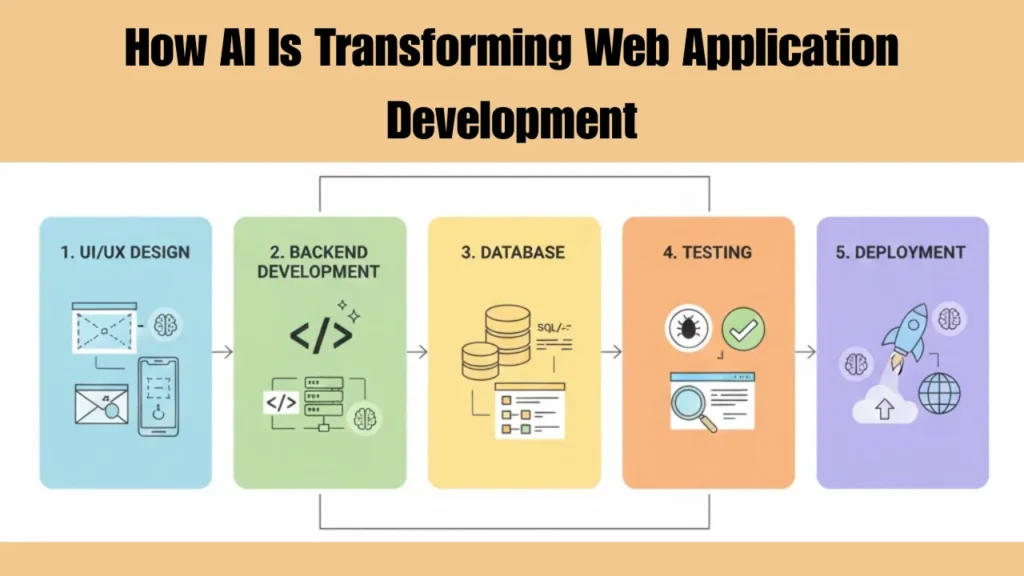

I still remember the moment AI stopped feeling like a “tool” and started feeling like a teammate.
It was not during a flashy demo or keynote. It happened at 2:14 AM while debugging a stubborn authentication issue in a production web app. Instead of jumping between Stack Overflow tabs, I pasted a messy chunk of backend logic into an AI assistant and asked a very human question:
“Why does this work locally but fail under load?”
The answer was not perfect. But it was good enough to change how I build web applications forever.
That was my real entry point into web application development AI, not the hype, but the quiet productivity shift that sneaks up on you when deadlines are real and users are waiting.
This article is not another surface-level overview. It is a breakdown of what actually changed in my workflow, what surprised me, what failed badly, and where AI genuinely earns its place in modern web development.
AI Did Not Replace Developers. It Rewired How We Think While Building
Before diving into tools and techniques, there is an uncomfortable truth worth stating.
AI does not magically make bad developers good.
But it makes experienced developers dangerously faster. What is interesting is that this speed does not automatically translate into blind trust. Recent findings from the broader developer community show a similar pattern. According to the Stack Overflow survey, many developers report faster output with AI tools, but still hesitate to rely on AI-generated logic for critical production paths, especially backend and data-heavy systems.
In my early experiments, junior-level tasks became trivial, but architecture decisions still depended on human judgment. What changed was the mental load. AI started absorbing the repetitive thinking, freeing me to focus on structure, UX, performance, and long-term maintainability.
That mental shift is the real transformation. That shift is not just anecdotal. GitHub’s own internal research on developer workflows shows measurable productivity gains when AI is used for repetitive and cognitive-heavy tasks, while still emphasizing the need for human review and decision-making, especially in production systems. Those findings closely mirror what I experienced in real projects while adopting AI more deeply into my daily workflow, as highlighted in GitHub research.
The First Real Win: Turning Ideas Into Working UI at Record Speed
Frontend development was the first area where AI proved itself beyond doubt.
What Actually Worked
I tested AI-driven UI generation using prompts like:
“Create a responsive dashboard layout using React and Tailwind for a SaaS analytics app.”
The result was not production-ready. But it was 70 percent there.
Instead of staring at a blank file, I was editing something tangible. That alone saved hours per project. As I kept pushing these UI generators further, it became clear that AI speed alone is not enough. The real advantage comes when you combine layout generation with the right supporting tools across your workflow. I broke down several of the tools that actually held up in real projects in AI tools for web developers, especially those that pair well with frontend UI generation instead of fighting against your design decisions.
Unexpected Insight
AI-generated UI tends to overuse patterns. Cards everywhere. Rounded buttons everywhere.
Once I noticed that, I started prompting differently:
“Avoid default card-heavy layouts. Use whitespace intentionally.”
The output quality improved immediately.
Where It Failed
AI struggles with nuanced brand identity.
If you care about visual storytelling, you still need human design thinking.
Backend Development: Less Boilerplate, More Architecture Thinking
Backend work changed more subtly.
AI excels at generating predictable code. CRUD APIs, authentication flows, data validation logic. All boring. All time-consuming.
Real Scenario
While building a multi-tenant SaaS app, I used AI to scaffold:
- User roles
- Permission middleware
- API versioning logic
What would normally take a full day took under two hours.
The Catch No One Talks About
AI-generated backend code often lacks defensive programming.
Edge cases, rate limits, abuse prevention. You must review carefully.
One time, an AI-generated API endpoint had no pagination guard. Under load, it would have melted the server.
Lesson learned: AI accelerates creation but increases the importance of review.
Database Design With AI: Surprisingly Useful, Slightly Dangerous
This one surprised me.
When asked to design database schemas, AI often suggests clean relational models. It understands normalization well.
What I Use It For Now
- Validating schema ideas
- Spotting missing indexes
- Suggesting relationships I overlooked
What I Never Trust Blindly
- Scaling assumptions
- Query optimization for large datasets
AI thinks logically, not statistically. It does not feel real traffic. That limitation becomes more obvious once an application moves beyond internal tools and starts supporting real customers, billing logic, and long-term growth. Most of the database pain I have seen only appears after products enter the B2B SaaS stage, where usage patterns are unpredictable and scaling mistakes become expensive rather than theoretical.
AI in Debugging: Faster Clarity, Not Perfect Fixes
Debugging with AI feels like pair programming with someone who never gets tired.
A Real Debugging Moment
I had a race condition bug in a WebSocket-based chat app. AI did not solve it instantly. But it reframed the problem in a way that led me to the fix.
That is the pattern I see often. AI improves clarity more than correctness. Once schemas move beyond theory and hit real traffic, the cracks usually show up through slow queries, timeouts, or unexpected load behavior. That is where AI stopped being a design assistant and became more useful as a diagnostic partner. I have seen this shift clearly while testing modern AI debugging tools, especially when tracing database-related performance issues that only appear under real usage.
Pro Tip
Paste logs, not assumptions.
AI performs significantly better when fed raw error output.
Testing and QA: Where AI Quietly Saves Money
This is where startups should pay attention.
AI-generated test cases reduced our QA cycle time dramatically.
What Worked Well
- Unit test scaffolding
- Edge case suggestions
- Mock data generation
What Still Needs Humans
- UX testing
- Accessibility testing
- Emotional friction points
AI can test logic. Humans test experience.
Deployment and DevOps: AI as a Safety Net, Not a Driver
AI-assisted DevOps is useful but should never be autonomous.
My Current Use
- Writing Dockerfiles faster
- Explaining CI pipeline failures
- Suggesting cloud cost optimizations
What I Avoid
- Auto-deploy scripts without review
- Security policy generation without audits
One wrong permission suggestion can expose an entire system. That gap between logical correctness and real-world behavior is also where many developers overestimate AI’s productivity gains. In practice, the time saved during schema generation can easily be lost later while fixing performance issues that only appear at scale. I broke this pattern down more honestly when testing whether AI coding assistants actually save time, especially in backend-heavy scenarios where databases become the bottleneck.
How AI Changed Team Dynamics in Web Projects
This part gets overlooked.
Once AI entered the workflow, junior developers started shipping features faster. Senior developers shifted toward reviews, architecture, and mentorship.
Velocity increased, but so did responsibility.
The best teams I have seen treat AI as a shared assistant, not a personal shortcut.
A Small Case Study: Building a SaaS MVP With AI in 30 Days
We built an internal analytics dashboard using AI-assisted development.
The Outcome
- MVP shipped in 28 days
- Codebase 35 percent smaller
- Fewer bugs post-launch than expected
The Hidden Cost
Onboarding new developers took longer.
AI-generated code lacked consistent style unless carefully guided.
Standardization matters more than ever.
Comparing AI-Driven Development vs Traditional Workflow
| Area | Traditional Approach | AI-Assisted Approach |
|---|---|---|
| Setup Time | High | Very Low |
| Code Quality | Predictable | Inconsistent without review |
| Debug Speed | Moderate | Fast |
| Learning Curve | Steep | Faster for juniors |
| Creativity | Human-led | Prompt-led |
The Real Limitations of Web Application Development AI
Let us be honest.
AI still cannot:
- Understand business politics
- Predict user emotions
- Replace architectural intuition
If you outsource thinking entirely, you will ship fragile software.
Where This Is All Going Next
From what I am seeing, AI will not replace developers.
It will replace developers who refuse to adapt.
Future web application development will look like this:
- Humans define intent and constraints
- AI generates possibilities
- Humans decide what survives
That balance is the real skill.
Final Thoughts From the Trenches
Web application development AI did not make me lazy.
It made me sharper.
It exposed weak thinking, rushed assumptions, and architectural shortcuts faster than any code review ever did.
If you treat AI as magic, it will disappoint you.
If you treat it as a junior teammate who works insanely fast, it will elevate you. That difference defines modern developers.
FAQ: AI and Modern Web Application Development
Is AI replacing web developers?
No. It replaces repetitive work, not judgment. Skilled developers become more valuable.
Is web application development AI safe for production use?
Yes, if paired with reviews, testing, and security audits. Blind trust is risky.
Which part of web development benefits most from AI?
Frontend scaffolding and backend boilerplate see the biggest gains.
Does AI-generated code hurt performance?
Not inherently, but it often lacks optimization without human refinement.
Can beginners rely on AI to learn web development?
AI accelerates learning, but fundamentals still matter. It should guide, not replace study.
Will AI reduce development costs long-term?
Yes, especially in MVP and iteration phases, if used responsibly.