Last year, I opened a legacy Laravel project I had not touched in months. The codebase was messy, undocumented and full of half-finished helper functions. Normally, this kind of cleanup drains hours.
But with GitHub Copilot pricing becoming more structured and accessible in 2026, I decided to test every tier seriously, not just the free trial.
Within minutes, Copilot suggested a refactor for a 120-line controller into smaller, testable methods. It even generated PHPUnit tests that actually passed. That was the moment it stopped feeling like an autocomplete tool and started feeling like a junior developer sitting beside me.
Still, the big question remained: Which Copilot plan is actually worth paying for?
Why GitHub Copilot Pricing Confuses So Many Developers
GitHub Copilot Pricing is not confusing because of the numbers.
It is confusing because GitHub sells Copilot as one thing, but developers experience it as something else entirely.
On the website, it is “AI pair programming.”
In practice, it becomes:
- A fast boilerplate generator
- A decent refactor helper
- A risky logic writer
- A surprisingly useful documentation assistant
- Occasionally, a confident liar
The price you pay only makes sense when you understand how often you rely on it and what type of work you do.
I learned this the hard way during a month when Copilot saved me hours on frontend scaffolding, then nearly shipped a broken authentication flow because I trusted it too much.
GitHub Copilot Pricing Tiers in 2026 at a Glance
Before we go deeper, here is the current structure most developers will see in 2026.
GitHub Copilot Pricing Overview (2026)
| Plan | Best For | Key Access |
|---|---|---|
| Copilot Free | Casual users, students | Limited suggestions, basic IDE support |
| Copilot Individual | Solo developers | Full code completion, chat, IDE integrations |
| Copilot Business | Teams and startups | Org controls, policy management, analytics |
| Copilot Enterprise | Large companies | Security, compliance, advanced governance |
Pricing changes by region and billing cycle. I always double-check before renewals. So instead of locking you into exact dollar amounts, I am focusing on value per tier, which matters far more long term.
For official up to date numbers, always cross check with GitHub’s documentation. I do this before renewals myself.
Copilot Free: Useful, But Intentionally Restrained
The free tier exists mostly to answer one question.
“Is Copilot for me?”
From my testing, Copilot Free is enough to:
- Generate small utility functions
- Speed up repetitive syntax
- Assist beginners learning patterns
What it does not do well is sustained, complex work.
In longer sessions, I noticed:
- Suggestions became shallow
- Context awareness dropped fast
- Multi file reasoning was almost nonexistent
If you code occasionally or are still exploring AI assisted development, the free tier is fine. But if you build production systems, you will hit its ceiling within days.
Copilot Individual: Where the Real Value Starts
This is the plan I used the longest, and it is where GitHub Copilot Pricing begins to make sense.
What Actually Improved My Workflow
Once upgraded, the difference was immediate:
- Copilot Chat became usable for refactors
- Context across files improved noticeably
- Boilerplate creation became consistent
- Inline suggestions felt more confident
In real projects, this translated to:
- Faster API layer setup
- Cleaner frontend components
- Reduced mental fatigue on repetitive logic
One unexpected win was using Copilot to explain legacy code I wrote myself two years earlier. It did not just summarize it. It helped me spot an edge case I had forgotten.
Where It Still Struggles
Even on the paid plan, Copilot is not a senior engineer.
I still had to:
- Review every auth related suggestion
- Rewrite data validation logic
- Reject complex business rules
This aligns closely with findings from GitHub’s own Copilot research documentation, which shows productivity gains alongside increased need for human review.
This is not a contradiction. It is reality.
For solo developers, Copilot Individual offers good value if you think of it as an assistant than rather a decider.
Copilot Business: Pricing Makes Sense Only at Team Scale
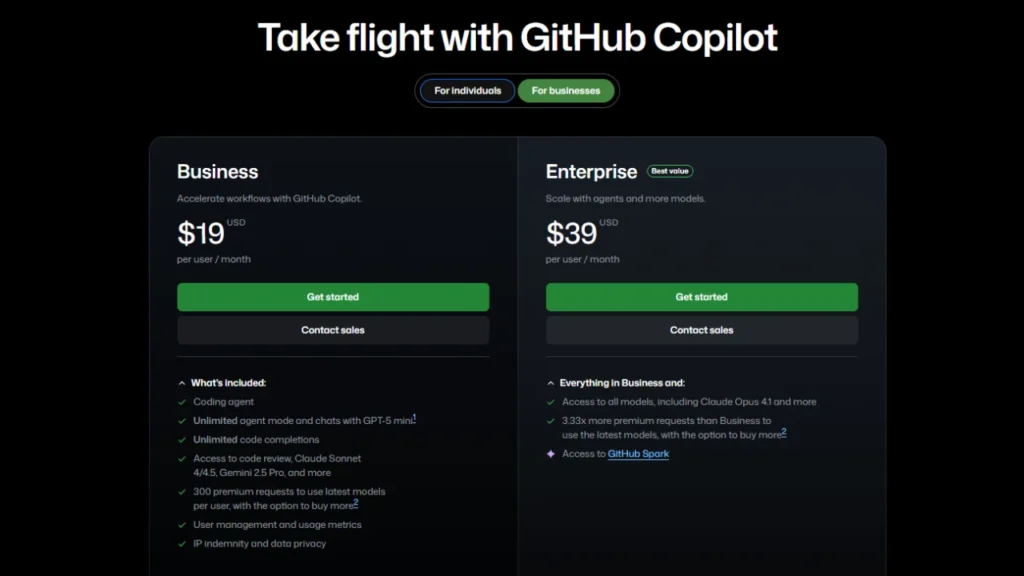
Copilot Business looks expensive until you manage multiple developers.
I tested this tier while consulting with a small startup team.
The biggest difference was not better code suggestions.
It was control.
What Teams Actually Gain
- Centralized policy enforcement
- Ability to disable risky suggestions
- Usage analytics across developers
- Consistent onboarding experience
One real example.
We noticed junior developers were accepting Copilot suggestions blindly. With Business controls, we limited certain features and saw code review quality improve within weeks.
That alone justified the cost.
What You Do Not Get
You do not get magically better AI.
Copilot Business does not make suggestions smarter. It makes usage safer.
If you run a team and care about maintainability, this tier earns its price. If you are just scaling seats without governance, it is overkill.
You might want to start here: AI Tools Developers Should Use Carefully.
Copilot Enterprise: Not for Most Developers and That Is Fine
Copilot Enterprise exists for legal departments as much as developers.
I have only tested this tier briefly through enterprise clients, and the pattern is clear.
You pay for:
- Compliance
- Auditability
- Data governance
- Enterprise level security controls
You do not pay for:
- Better suggestions
- Faster coding
- Creative solutions
This tier is a must if you work at a big company dealing with sensitive codebases. So if you’re a lone developer reading this, then feel free to skip this.
The Hidden Cost Nobody Talks About
GitHub Copilot Pricing is not just subscription based.
The real cost is overreliance.
I tracked my own workflow for two weeks and noticed something uncomfortable.
When Copilot was disabled, I felt slower at first.
That dependency is subtle and dangerous.
The fix was intentional friction:
- Turning off suggestions during critical logic
- Using Copilot mainly for structure and syntax
- Reviewing code as if written by a junior dev
Once I adopted this mindset, Copilot became an asset instead of a crutch. This is something I explored more deeply in a separate breakdown on are AI Coding Assistants actually save your time, where I tracked real development hours instead of relying on marketing claims.
Copilot vs Alternatives: Is the Pricing Still Competitive?
In 2026, Copilot no longer exists alone.
Tools like Codeium, Cursor, and ChatGPT based IDEs offer strong competition.
From my testing:
- Copilot excels at inline suggestions
- Chat based tools are better at explanations
- Codeium offers generous free tiers
So why still pay for Copilot?
Because it integrates deeply into GitHub workflows. That ecosystem lock in is real and powerful.
If you already live inside GitHub, Copilot pricing feels justified. If not, alternatives may offer better value.
Confused about GitHub Copilot pricing? Our guide explains all plans, free trials and value tips to help you choose the best option. If a plan doesn’t fit your needs, explore the 7 best GitHub Copilot alternatives for smarter coding choices.
Should You Pay for GitHub Copilot in 2026?
Here is my honest take.
- If you code daily, Copilot Individual is worth it.
- If you manage a team, Copilot Business pays for itself through better governance.
- If you expect AI to replace thinking, no tier will save you.
GitHub Copilot Pricing only makes sense when you understand what you are buying. You are not buying intelligence. You are buying acceleration.
Final Thoughts and Real Recommendation
After years of using Copilot, canceling it, re subscribing, and testing competitors, my stance is simple.
Copilot is not overpriced. It is misunderstood.
Used correctly, it pays for itself within days. Used blindly, it creates technical debt faster than it writes code.
If you want deeper comparisons, real usage breakdowns, and AI tooling insights, explore related posts on Advance Techie and share your own experience in the comments. I read them all and they often shape future articles.
FAQ: GitHub Copilot Pricing Explained
Is GitHub Copilot free in 2026?
There is a free tier, but it’s extremely limited and used mostly for evaluating the product or using it casually.
Is Copilot worth paying for as a solo developer?
Yes, if you code regularly and use it for structure and productivity, not logic decisions.
Does Copilot Business improve code quality?
Indirectly. It improves governance and review discipline, not AI intelligence.