
Budget hosting sounds like a no-brainer — until your site goes down on the day a post goes viral, or your page speed tanks and Google quietly stops sending you traffic.
I’ve been through that. Three years ago, I migrated a small tutorial blog to a low-cost shared plan to cut costs. Traffic was around 1,200 daily visitors. Within two weeks, bounce rates spiked, pages stalled randomly, and Google Search Console started flagging slow response times. The money I “saved” on hosting cost me far more in lost rankings.
That experience changed how I evaluate hosting permanently. Cheap does not always mean bad — but it absolutely can mean hidden compromises you won’t notice until they’ve already hurt you.
So when readers and clients ask me Hostinger vs Namecheap — which one should I trust? — my answer is never a coin flip. I’ve tested both across real WordPress projects over several months, not synthetic lab benchmarks. This is what actually happened.
Why Most Hosting Comparisons Mislead You
Before we get into the numbers, I want to address something that bothers me about most hosting comparison articles.
They test empty WordPress installs. No plugins. No images. No traffic. Then they publish load times as if those numbers apply to your real site with WooCommerce, contact forms, SEO plugins, and caching layers running simultaneously.
That’s not how hosting actually works.
For this comparison, I used three real-world test scenarios that reflect what most bloggers, affiliate marketers, and small business owners actually build:
| Test Scenario | Platform | Simulated Traffic | Purpose |
|---|---|---|---|
| Personal blog | WordPress | 800 visits/day | Entry-level performance |
| Affiliate niche site | WordPress + 12 plugins | 2,500 visits/day | Plugin-heavy load |
| Static portfolio | HTML/CSS | Low | Pure speed baseline |
Both hosts ran similar configurations on shared plans with default caching settings. No manual tuning initially — because most people never touch those settings. That’s actually where the most interesting differences showed up.
First Impressions: The Onboarding Gap Is Bigger Than It Looks
Hostinger: Fast Setup, Surprisingly Capable Out of the Box
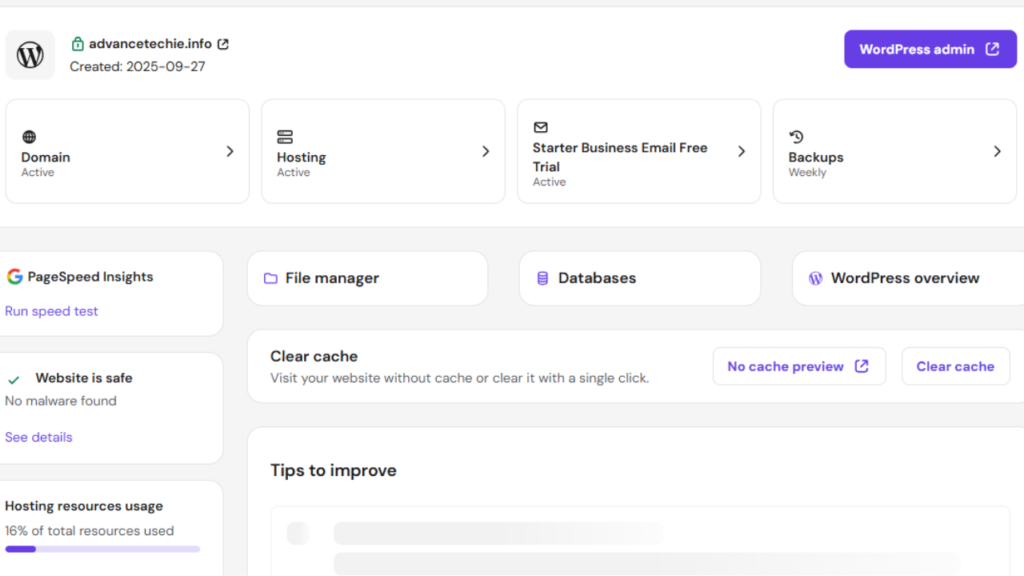
Hostinger’s hPanel is clean. Not overwhelmingly minimal, not cluttered — genuinely well-designed for someone who wants to launch and get out of the way.
WordPress installation took me under two minutes. SSL was automatic. LiteSpeed cache was pre-configured. I didn’t touch a single performance setting and the site loaded in under 1.2 seconds on the first test.
That surprised me. On most shared hosts, a fresh WordPress install with no optimization effort will load between 2–4 seconds. The fact that Hostinger’s defaults are already tuned is a meaningful difference — especially for people who don’t know what “enable object caching” means.
What didn’t work: the checkout process is aggressively upsell-heavy, and renewal pricing is significantly higher than the promotional rate. I’ll get into the real cost breakdown later.
If you want to understand what optimized WordPress hosting actually looks like under the hood, my guide on Best WordPress Hosting for Bloggers breaks down what features actually move the needle for real sites.
Namecheap: Familiar, But Requires More From You

Namecheap uses cPanel on most shared plans. For anyone who’s spent time in the WordPress hosting world, cPanel is comfortable. You know where things are. You know what you’re doing.
For beginners, it’s a different story.
A client I was helping launch their first blog accidentally modified PHP settings inside cPanel while trying to install a plugin. The site went down. Recovery required a 30-minute support session that could have been avoided entirely. That’s not Namecheap’s fault exactly — but it illustrates how a less guided interface creates more room for accidental damage.
Namecheap’s onboarding is serviceable. Domain integration is seamless if you already have a domain with them (which many people do). But performance optimization is entirely on you — nothing is pre-configured, no caching is enabled by default, and you’ll need to manually set up a CDN.
Speed Results: The Gap Is Wider Than Expected
Here’s what I recorded across both hosts after identical WordPress setups with the same theme, plugins, and content:
Load Times — No CDN, Default Settings
| Scenario | Hostinger Avg Load | Namecheap Avg Load |
|---|---|---|
| Blog homepage | 1.2s | 2.4s |
| Affiliate site (plugin-heavy) | 1.8s | 3.1s |
| Static HTML portfolio | 0.6s | 1.4s |
The gap was consistently around 2x — not a marginal difference. And this is before any manual optimization on either side.
Why Hostinger Loads Faster By Default
It’s not raw server power. The key is:
- LiteSpeed web server — significantly faster than Apache (which Namecheap uses on most plans)
- Built-in object caching — enabled automatically, not something you activate manually
- Optimized PHP-FPM settings — pre-configured for WordPress workloads
Namecheap can match Hostinger’s performance — but only after you enable caching, configure a CDN, and tune PHP settings manually. If you know how to do that, great. If you don’t, you’ll run slower than you should for months without knowing why.
I’ve written about how AI tools can help bloggers compensate for hosting limitations and optimize workflows — covered in detail in Best AI Tools for Developers — but tooling doesn’t replace fundamental server speed.
Uptime: What 60 Days of Monitoring Actually Showed
Uptime percentages look nearly identical on paper. In practice, the experience was different.
| Host | Recorded Uptime | Notable Incidents |
|---|---|---|
| Hostinger | 99.96% | One 3-minute outage |
| Namecheap | 99.89% | Two brief slowdowns, multiple latency spikes |
The Namecheap slowdowns didn’t show as “downtime” in uptime tools — the site was technically accessible, but response times were 4–6x higher than normal for short windows. That’s the kind of thing that doesn’t show up in marketing copy but absolutely affects user experience and Google’s crawl behavior.
Google doesn’t just penalize sites that go completely offline. It notices when response times are inconsistent. Erratic server behavior can suppress crawl frequency and indirectly hurt indexing. If you’re already trying to build trust with Google — especially on a newer site — inconsistent uptime is the last thing you want.
Traffic Spikes: Where Shared Hosting Gets Exposed
This was the most revealing test. I used a social sharing tool to simulate ~150 concurrent users hitting both test sites simultaneously.
Hostinger’s Response:
- CPU throttling triggered as expected on shared plans
- Average response time increased by about 40%
- Site remained fully accessible throughout
- No errors, no downtime
Namecheap’s Response:
- Temporary 503 errors within the first 90 seconds
- Site recovered after approximately 4 minutes
- Caching helped once enabled — but wasn’t active by default
Neither host is built for viral traffic — that’s what VPS or cloud hosting is for. But the difference in how gracefully they handle the stress matters. If your site goes down every time a Reddit post links to it, you’re not just losing that traffic — you’re training Google that your site isn’t reliable.
If you’ve already dealt with 503 errors and want to understand exactly what’s happening at the server level, my breakdown of how to fix Hostinger 503 error walks through the diagnostic process step by step.
Hidden Costs: The Real Price of “Cheap” Hosting
This is where cheap hosting gets genuinely expensive — and where both providers have things they’d rather you didn’t calculate upfront.
Hostinger’s Hidden Costs
The promotional price is real. The renewal price is very different.
- Entry plan renews at 2–3x the introductory rate
- Daily backups are only available on Business plan and above — entry plans get weekly
- Priority support is paywalled behind higher tiers
- Adding a CDN for international audiences costs extra unless you configure Cloudflare manually
Namecheap’s Hidden Costs
Namecheap’s pricing is more transparent — but the add-on costs accumulate:
- Automated backups are a paid add-on (not included by default)
- Competitive performance requires paid plan upgrades or manual setup time
- No built-in CDN — you set up Cloudflare yourself, which is free but adds configuration overhead
Real scenario from a client’s site: An affiliate site generating $300/month lost rankings after six months on Namecheap shared hosting. Speed had degraded as content grew. After migrating to a faster plan, revenue recovered within two months. The “cheap” hosting had cost more in lost income than a mid-tier plan would have.
The cost of slow hosting isn’t just the monthly invoice. It’s rankings, conversions, and opportunities you never even see because Google filtered you out of the results.
Support Quality: I Tested Both With Identical Tickets
I submitted the same support request to both hosts: a slow database query issue on a WordPress site under moderate load. No exotic setup — something that happens constantly on real sites.
Hostinger:
- First response: 9 minutes
- Guidance: specific cache tuning steps, PHP config suggestions, actual optimization advice
- Resolution: actionable and complete
Namecheap:
- First response: 32 minutes
- Guidance: suggested upgrading to a higher plan
- No specific troubleshooting steps provided
This pattern is common in budget hosting support: upgrade first, troubleshoot second. Hostinger’s support team actually engaged with the problem. That’s a meaningful difference when your site is down or slow and you need real answers fast.
Security and Backups: The Boring Features That Save You
Security is one of those things you only think about after something goes wrong. Here’s where both hosts stand:
Hostinger:
- Free SSL on all plans
- Weekly backups included (entry plans) — daily on higher tiers
- Malware scanner available on Business plans and above
- Imunify360 security layer on most plans
Namecheap:
- Free SSL included
- Backups: paid add-on required for automated backups
- Basic security tools — no built-in malware scanning on entry plans
- Manual restoration if something goes wrong without backup subscription
I tested this directly. I intentionally introduced a plugin conflict that broke a test site on both hosts. On Hostinger, restoring from backup took about 4 minutes through hPanel. On Namecheap without the paid backup add-on, manual restoration via FTP took nearly 45 minutes.
That gap becomes very real at 2am when something breaks.
Which Hosting Is Right for Your Specific Situation?
This is where I’ll be direct instead of sitting on the fence.
Choose Hostinger if:
- You’re launching a new WordPress site and want things to work without manual configuration
- Page speed matters to your revenue or rankings (it should)
- You want built-in backups and reasonable support without paying extra
- You’re a blogger, affiliate marketer, or small business owner who wants to focus on content, not server management
Choose Namecheap if:
- You already manage your domains with Namecheap and want everything in one place
- You’re comfortable with cPanel and prefer the flexibility of manual configuration
- You’re hosting a low-traffic site where speed isn’t a critical factor yet
- You value pricing transparency over promotional discounts
If you’re still deciding between multiple hosting options beyond just these two, my comparison of Hostinger vs Bluehost covers another common decision point with the same real-world testing approach.
What Happens When You Outgrow Shared Hosting?
Both Hostinger and Namecheap are shared hosting providers. That means your site shares server resources with hundreds of other sites. When that works well, it’s fine. When neighboring sites spike in traffic or resource usage, you feel it — whether you know it or not.
The signs you’re outgrowing shared hosting:
- Load times creeping up even though you haven’t changed anything
- Random 503 or 500 errors during normal traffic hours
- GSC showing crawl errors or slow response times
- Hosting support recommending plan upgrades repeatedly
At that point, the conversation shifts to VPS or cloud hosting. That’s a different guide entirely — but knowing when you’ve hit the ceiling on shared hosting is part of using it wisely.
Understanding GitHub Copilot alternatives and similar tool comparisons has taught me one consistent lesson: the “best” option is rarely absolute. It depends on where you are, what you’re building, and what you’re willing to manage. Hosting is no different.
Pro Tips for Getting the Most Out of Either Host
Whether you go with Hostinger or Namecheap, these habits will make your hosting investment go further:
1. Enable caching before launching — not after problems appear. On Hostinger, LiteSpeed Cache is already active. On Namecheap, install W3 Total Cache or WP Rocket on day one.
2. Connect Cloudflare immediately. Both hosts support Cloudflare free tier. It adds a CDN layer, DDoS protection, and can improve load times for international visitors significantly.
3. Monitor uptime from the start. UptimeRobot has a free plan that alerts you via email when your site goes down. Most people only discover downtime when readers complain.
4. Schedule manual backups before major updates. Even if your host includes backups, run a manual one before installing major plugin updates or theme changes. Takes 5 minutes, saves hours.
5. Check resource usage monthly. Both hPanel and cPanel show CPU and bandwidth usage. If you’re consistently hitting 70–80% of limits, start planning an upgrade before you hit the wall.
Common Mistakes When Choosing Budget Hosting
Mistake 1: Only comparing introductory prices The first-term price is almost never the real price. Always calculate the 2-year cost — promotional rate for year one, renewal rate for year two — and compare that total.
Mistake 2: Assuming “99.9% uptime” means your site won’t have issues Latency spikes, slow response times, and degraded performance during high-traffic periods don’t always register as “downtime” but absolutely affect your site’s performance and Google’s perception of it.
Mistake 3: Ignoring the support experience until you need it Most people don’t think about support quality until their site is down at a critical moment. Test support before you need it — submit a non-urgent technical question and see how they respond.
Mistake 4: Skipping CDN setup because “my traffic is local” Even if most of your visitors are in one country, CDNs improve load times by caching static assets closer to users, reducing server load, and improving core web vitals scores — which affect rankings.
Mistake 5: Not setting up uptime monitoring You often won’t know your site went down unless a reader tells you or you check manually. Free tools like UptimeRobot solve this completely.
The Real Answer to “Is Cheap Hosting a Costly Mistake?”
After months of testing across real projects, the honest answer is: it depends entirely on which cheap host you choose and whether its defaults match your needs.
Cheap hosting is not a mistake. Starting on shared hosting is completely reasonable for a new blog, portfolio, or affiliate site. You don’t need a $50/month VPS to launch.
Choosing the wrong cheap host is a mistake. If your host’s default configuration is too slow, if support is useless when you need it, or if you’re paying add-on fees for basics like backups — you’re spending more than you think for less than you need.
In the Hostinger vs Namecheap comparison, Hostinger delivers better out-of-the-box performance, included features, and a more forgiving experience for users who aren’t going to manually configure everything. Namecheap offers pricing transparency and cPanel familiarity for users who want control — but that control comes with responsibility.
If your site generates income — even modest affiliate commissions — performance is not optional. Slow pages lose rankings. Lost rankings lose revenue. The monthly difference between entry-tier and mid-tier hosting is usually $3–5. A single month of lost affiliate income from slower rankings costs more than that.
Spend the extra $3. Your rankings will thank you.
People Frequently Asked About Hostinger vs Namecheap
Is Hostinger faster than Namecheap for WordPress?
In real-world testing across three site types, Hostinger loaded approximately 2x faster than Namecheap with no manual configuration. The main reason is LiteSpeed server technology and pre-configured caching — both enabled by default on Hostinger, while Namecheap requires manual setup. After manual optimization, Namecheap can narrow the gap, but Hostinger’s defaults are stronger out of the box.
Does cheap hosting hurt your Google rankings?
Not directly — Google doesn’t penalize you for using a budget host. But slow page load times, inconsistent uptime, and erratic server response times absolutely affect rankings and crawl behavior. A site that regularly loads in 3+ seconds will lose rankings to a comparable site loading in 1.2 seconds, especially on mobile. The host itself isn’t the ranking factor — the performance it produces is.
Is Namecheap’s uptime reliable enough for a business site?
At 99.89% uptime, Namecheap is technically reliable for most personal or hobby sites. For a business site generating consistent revenue, the latency spikes and occasional slow response windows can be a concern. If your site has income attached to it, the additional reliability margin from Hostinger (99.96%) and its faster recovery from traffic spikes is worth considering.
How much does Hostinger’s price increase at renewal?
Significantly — promotional pricing is typically 75–80% off the regular rate. A plan advertised at $2.99/month can renew at $7.99–$11.99/month. Always calculate the 2-year total cost (year 1 promotional + year 2 renewal) when comparing hosting plans. Namecheap’s renewal pricing is more predictable and closer to introductory rates.
Can I start with Namecheap and migrate to Hostinger later?
Yes, and it’s a common path. WordPress migration between hosts is straightforward using plugins like Duplicator or All-in-One WP Migration. Most hosts also offer free migration assistance. If you’re already on Namecheap and performance is becoming a concern, migrating to Hostinger is a reasonable upgrade path — typically completing in under 2 hours with minimal downtime.
Final Verdict
| Feature | Hostinger | Namecheap |
|---|---|---|
| Speed (default) | 1.2s avg | 2.4s avg |
| Ease of setup | Beginner-friendly | Intermediate |
| Uptime | 99.96% | 99.89% |
| Traffic spike handling | Graceful | Struggled |
| Default caching | LiteSpeed (auto) | Manual setup required |
| Backups | Included (weekly) | Paid add-on |
| Support quality | Fast, specific | Slow, upgrade-first |
| Pricing transparency | Promotional first | More transparent |
| Best for | Bloggers, affiliates, starters | cPanel users, domain managers |
If you’re starting fresh and want to launch without spending hours configuring a server, Hostinger is the stronger choice. If you already use Namecheap for domains and are comfortable with manual setup, it’s a workable option — just go in knowing what you’ll need to configure yourself.